



Cheerlux C9 WiFi LED Projector 720P
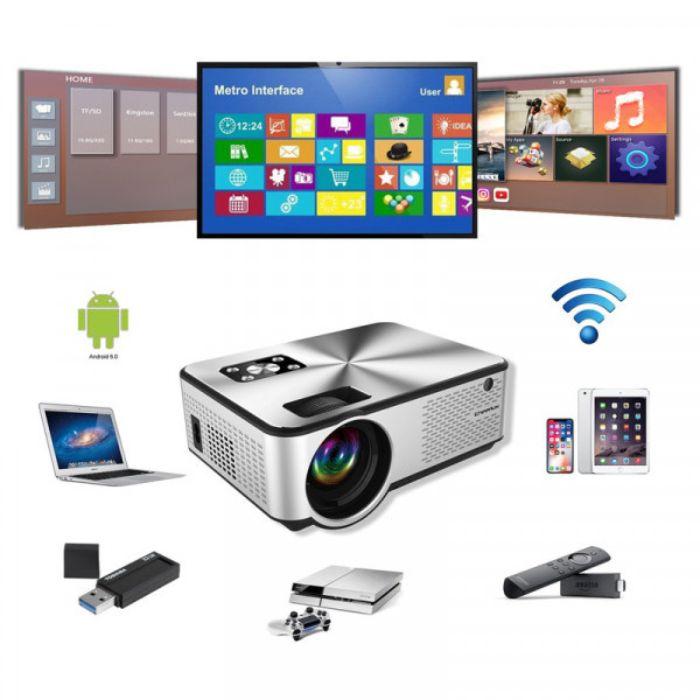
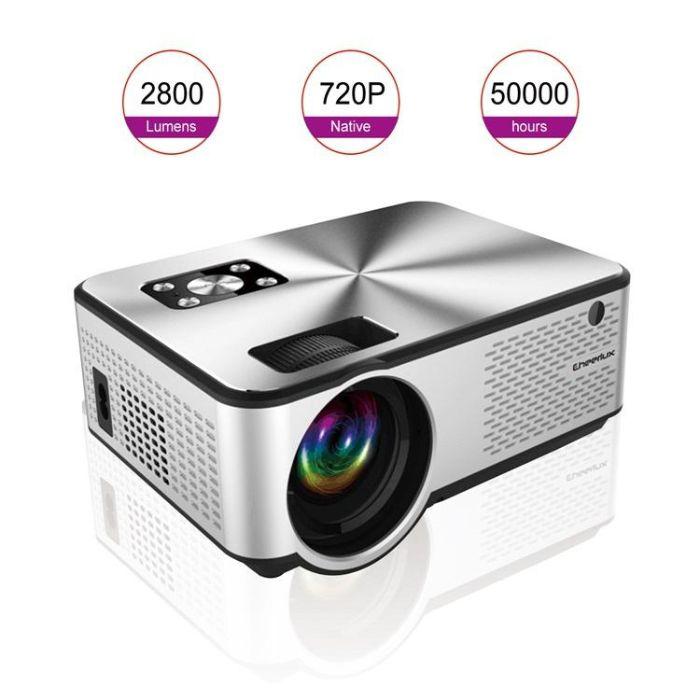
Cheerlux C9 WiFi LED Projector বাসায় movie, sports, gaming, presentation এবং বড় screen entertainment-এর জন্য একটি versatile LCD projector। এতে native 1280 × 720 resolution, 1080P input support, 50 থেকে 120-inch projection size, built-in speaker এবং HDMI, USB, VGA, AV ও 3.5mm audio interface রয়েছে।
বাসা ও অফিসে বড় Screen Entertainment-এর সহজ ব্যবস্থা
Movie, sports, YouTube content, gaming অথবা presentation ছোট mobile বা laptop screen-এর বদলে বড় আকারে উপভোগ করতে Cheerlux C9 LED Projector ব্যবহার করা যায়। এটি LCD display technology ও LED lamp ব্যবহার করে wall বা projection screen-এর ওপর বড় image তৈরি করে।
Native 720P resolution সাধারণ home entertainment এবং office presentation-এর জন্য পরিষ্কার picture দিতে সহায়তা করে। HDMI, USB, VGA ও AV interface থাকায় laptop, computer, media player এবং বিভিন্ন compatible device সংযুক্ত করার সুযোগ রয়েছে।
প্রধান বৈশিষ্ট্য
- Cheerlux C9 LED projector
- Native 1280 × 720 resolution
- 1080P video input support
- LCD display technology
- LED projection lamp
- Advertised brightness 2800 lumens
- 2000:1 contrast ratio
- 50 থেকে 120-inch image projection
- 1 থেকে 3 মিটার projection distance
- 16:9 ও 4:3 aspect ratio
- HDMI input
- USB media playback
- VGA input
- AV input
- 3.5mm audio interface
- Built-in speaker
- Remote control
- Photo, video ও audio file support
- Computer, laptop, mobile ও tablet-এর সঙ্গে ব্যবহারযোগ্য
- Home entertainment, business ও presentation-এর জন্য উপযোগী
Native 720P Resolution
Projectorটির native resolution 1280 × 720 pixels। অর্থাৎ projector panel pictureকে মূলত 720P resolution-এ display করে।
Native 720P উপযোগী:
- Movie ও drama
- Sports viewing
- YouTube video
- Cartoon
- Casual gaming
- Presentation
- Photo slideshow
- Home entertainment
Picture clarity নির্ভর করবে video source, projection size, wall বা screen এবং room-এর lighting-এর ওপর।
1080P Support বলতে কী বোঝায়
Cheerlux C9 1080P video input গ্রহণ করতে পারে। তবে native display resolution 720P হওয়ায় 1080P content projectorটি process করে 720P panel অনুযায়ী দেখাবে।
এটি native Full HD projector নয়। তাই:
- 1080P file play হতে পারে
- HDMI থেকে Full HD signal গ্রহণ করতে পারে
- Final displayed detail native 720P panel অনুযায়ী হবে
- ছোট text ও fine detail native 1080P projector-এর মতো sharp নাও হতে পারে
Product comparison করার সময় native resolution এবং supported resolution আলাদাভাবে বিবেচনা করুন।
50 থেকে 120-Inch Projection Size
Supplier-provided specification অনুযায়ী projectorটি প্রায় 50 থেকে 120-inch পর্যন্ত image তৈরি করতে পারে।
প্রয়োজন অনুযায়ী ব্যবহার করা যায়:
- ছোট bedroom screen
- Living room movie setup
- Classroom বা training presentation
- Office meeting
- Family entertainment
- Casual gaming setup
Image size বড় করলে brightness ও sharpness তুলনামূলক কম অনুভূত হতে পারে। পরিষ্কার picture-এর জন্য room dark রাখা এবং উপযুক্ত projection screen ব্যবহার করা ভালো।
1 থেকে 3 মিটার Projection Distance
Projector ও screen-এর মধ্যে প্রায় 1 থেকে 3 মিটার দূরত্ব রেখে image size adjust করা যায়।
Setup করার সময়:
- Projector screen বা সাদা wall-এর সামনে রাখুন।
- প্রথমে প্রায় 1.5 থেকে 2 মিটার দূরত্ব থেকে পরীক্ষা করুন।
- প্রয়োজন অনুযায়ী projector সামনে বা পেছনে সরান।
- Focus control দিয়ে picture পরিষ্কার করুন।
- Image screen-এর মধ্যে ঠিকভাবে বসছে কি না দেখুন।
- Projector যতটা সম্ভব screen-এর কেন্দ্র বরাবর রাখুন।
Throw ratio 1.2 উল্লেখ করা হয়েছে, তবে actual image size setup ও focus range অনুযায়ী কিছুটা পরিবর্তিত হতে পারে।
Advertised 2800 Lumens Brightness
Product information-এ brightness 2800 lumens উল্লেখ করা হয়েছে। এটি supplier-provided brightness claim এবং ANSI lumens হিসেবে উল্লেখ করা হয়নি।
বাস্তব viewing experience নির্ভর করবে:
- Room কতটা অন্ধকার
- Projection size
- Screen material
- Lamp condition
- Picture mode
- Video content
- Projector ও wall-এর দূরত্ব
Best picture পাওয়ার জন্য:
- Curtain বন্ধ করুন
- Room light কমিয়ে দিন
- সাদা বা projector-compatible screen ব্যবহার করুন
- সরাসরি sunlight এড়িয়ে চলুন
- প্রয়োজনের চেয়ে অতিরিক্ত বড় image তৈরি করবেন না
2000:1 Contrast Ratio
Contrast ratio 2000:1 উল্লেখ রয়েছে। এটি bright ও dark অংশের মধ্যে পার্থক্য তৈরি করতে সহায়তা করে।
Dark scene ভালোভাবে দেখার জন্য room-এর আলো কম রাখা প্রয়োজন। উজ্জ্বল room-এ black area ধূসর দেখাতে পারে এবং picture contrast কম অনুভূত হতে পারে।
16:9 ও 4:3 Aspect Ratio
Projectorটি দুটি সাধারণ aspect ratio support করে:
- 16:9: Movie, YouTube, sports ও modern video content
- 4:3: পুরোনো video, document ও কিছু presentation
Content অনুযায়ী সঠিক aspect ratio নির্বাচন করলে image stretched বা compressed দেখানোর সম্ভাবনা কমে।
HDMI Connection
HDMI port ব্যবহার করে compatible device থেকে digital video ও audio signal নেওয়া যায়।
HDMI-এর মাধ্যমে সংযুক্ত করা যেতে পারে:
- Laptop
- Desktop computer
- TV box
- Gaming console
- Streaming device
- DVD বা media player
- Supported camera
HDMI cable package-এর সঙ্গে included কি না উল্লেখ করা হয়নি। প্রয়োজন হলে আলাদাভাবে কিনতে হতে পারে।
Smartphone Connection
Product information অনুযায়ী iOS ও mobile phone compatibility রয়েছে। তবে সব smartphone সরাসরি projector-এর সঙ্গে connect হবে না।
Phone অনুযায়ী প্রয়োজন হতে পারে:
- USB-C to HDMI adapter
- Lightning to HDMI adapter
- MHL-compatible adapter
- Wireless screen-mirroring setup
- Compatible casting device
- Phone-এর screen-casting support
সব charging cable video signal বহন করে না। সাধারণ USB charging cable দিয়ে phone screen projection নাও হতে পারে।
WiFi Function সম্পর্কে গুরুত্বপূর্ণ তথ্য
Product title-এ WiFi উল্লেখ রয়েছে, তবে provided technical specification-এ WiFi standard, app name, screen-mirroring protocol অথবা supported WiFi band দেওয়া হয়নি।
Product variant অনুযায়ী WiFi feature হতে পারে:
- Wireless screen mirroring
- Android phone casting
- iPhone screen mirroring
- External WiFi dongle support
- Limited app-based connection
পণ্য পাওয়ার পর নিশ্চিত করুন:
- Settings-এ WiFi menu রয়েছে কি না
- Miracast, AirPlay বা অন্য casting option আছে কি না
- 2.4GHz বা 5GHz কোন network support করে
- External dongle প্রয়োজন কি না
- Phone ও projector একই network-এ রাখতে হয় কি না
WiFi গুরুত্বপূর্ণ হলে স্থায়ী ব্যবহার শুরু করার আগে Android ও iPhone, উভয় supported connection method পরীক্ষা করুন।
Bluetooth Support নেই
Specification অনুযায়ী projectorটিতে Bluetooth support নেই।
তাই wireless Bluetooth speaker বা headphone সরাসরি pair করা যাবে না। External audio ব্যবহারের জন্য 3.5mm audio output, HDMI-connected device অথবা অন্য compatible wired connection ব্যবহার করতে হতে পারে।
USB Media Playback
USB port-এ compatible storage device সংযুক্ত করে supported photo, audio ও video file চালানো যেতে পারে।
Supported picture formats:
- JPG
- PNG
- BMP
Supported video formats:
- DAT
- TS
- MP4
- MPG
- MPEG
- AVI
- MKV
- MOV
- WMV
- ASF
- FLV
- 3GP
- 3GPP
- TP
- TRP
Supported audio formats-এর তালিকায় MP3, WAV, M4A এবং কিছু media container format রয়েছে।
File playback নির্ভর করবে:
- Video codec
- Audio codec
- File resolution
- Bitrate
- USB drive format
- File size
- Media encoding
একই extension-এর সব file play নাও হতে পারে, কারণ internal codec ভিন্ন হতে পারে।
External Subtitle Support নেই
Specification অনুযায়ী external subtitle support নেই। তাই আলাদা .srt subtitle file projector-এর USB player থেকে কাজ নাও করতে পারে।
Subtitle দেখার জন্য:
- Video file-এর মধ্যে subtitle embed করুন
- Laptop বা media player থেকে video চালান
- HDMI-connected device-এর subtitle function ব্যবহার করুন
- Video player app-এর মাধ্যমে subtitle display করুন
Built-In Speaker
Projectorটিতে built-in speaker রয়েছে। ছোট room-এ সাধারণ movie, video ও presentation audio শোনার জন্য এটি ব্যবহার করা যায়।
আরও শক্তিশালী sound প্রয়োজন হলে 3.5mm audio connection-এর মাধ্যমে compatible external speaker ব্যবহার করা যেতে পারে।
Built-in speaker performance নির্ভর করবে:
- Source volume
- Room size
- Content type
- Projector placement
- Audio encoding
বড় room বা cinematic sound-এর জন্য আলাদা speaker system বেশি উপযোগী।
VGA ও AV Interface
VGA port ব্যবহার করে পুরোনো desktop computer বা laptop-এর video output সংযুক্ত করা যায়। VGA সাধারণত শুধু video বহন করে, তাই audio-এর জন্য আলাদা cable প্রয়োজন হতে পারে।
AV input ব্যবহার করা যেতে পারে:
- পুরোনো DVD player
- Set-top box
- Legacy media device
- Composite video source
Required AV adapter বা cable included কি না actual package অনুযায়ী পরীক্ষা করুন।
DVD Player Function সম্পর্কে তথ্য
Supplier specification-এ DVD Player function-এর উল্লেখ রয়েছে। তবে package details বা physical interface description-এ built-in disc tray সম্পর্কে পরিষ্কার তথ্য নেই।
এ কারণে:
- Built-in DVD drive রয়েছে কি না physical product দেখে নিশ্চিত করুন
- External DVD player HDMI বা AV দিয়ে connect করা যেতে পারে
- Disc সরাসরি projector-এ ঢোকানো যাবে ধরে নেবেন না
- Variant অনুযায়ী function ভিন্ন হতে পারে
LED Lamp ও Advertised Lamp Life
Projectorটিতে LED lamp রয়েছে এবং supplier information অনুযায়ী lamp life প্রায় 50,000 ঘণ্টা পর্যন্ত হতে পারে।
Actual lamp life নির্ভর করবে:
- Daily usage
- Ventilation
- Operating temperature
- Dust accumulation
- Power stability
- Projector shutdown method
- Brightness setting
- Internal component quality
50,000 ঘণ্টা একটি advertised maximum figure, guaranteed service life নয়।
Cooling ও Ventilation
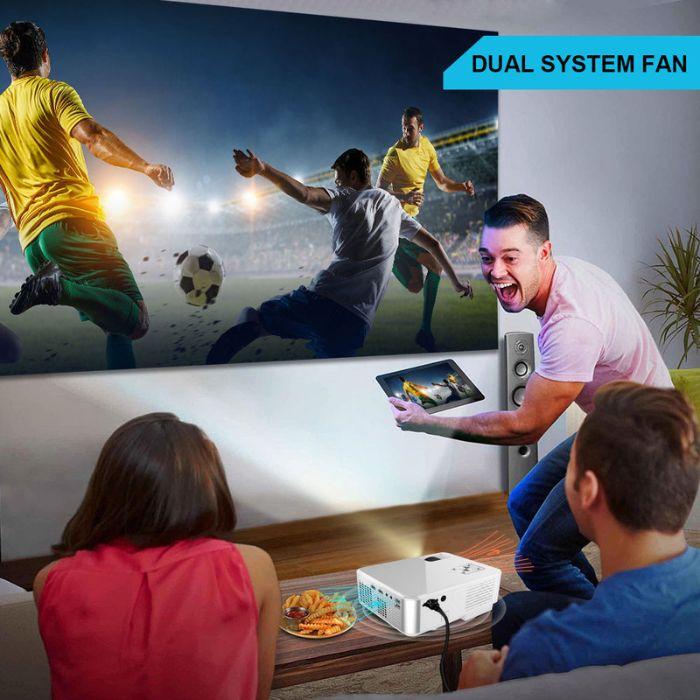
Projector চালু থাকলে internal lamp ও electronics থেকে তাপ তৈরি হয়। Cooling fan সেই তাপ বের করে দেয়।
ভালো ventilation-এর জন্য:
- Air inlet ও outlet খোলা রাখুন
- Wall থেকে কিছুটা দূরে রাখুন
- Bed, sofa বা pillow-এর ওপর রাখবেন না
- Projector ঢেকে ব্যবহার করবেন না
- ধুলাবালি বেশি এমন জায়গা এড়িয়ে চলুন
- Fan noise বা overheating অস্বাভাবিক হলে বন্ধ করুন
- ব্যবহারের পর normal shutdown process অনুসরণ করুন
Remote Control
Remote control-এর মাধ্যমে projector-এর menu, source, volume, navigation এবং media playback control করা যায়।
Remote-এর জন্য 2টি AAA battery প্রয়োজন, যা included নয়।
Remote ব্যবহার করার সময়:
- একই ধরনের দুটি নতুন battery ব্যবহার করুন
- Positive ও negative polarity সঠিক রাখুন
- পুরোনো ও নতুন battery একসঙ্গে ব্যবহার করবেন না
- দীর্ঘদিন ব্যবহার না করলে battery খুলে রাখুন
- Remote sensor-এর দিকে নির্দেশ করুন
- Liquid থেকে দূরে রাখুন
Projector Setup করার নিয়ম
- Projector শক্ত ও সমতল surface-এর ওপর রাখুন।
- Air vent block হচ্ছে কি না পরীক্ষা করুন।
- Power adapter ও cable সংযুক্ত করুন।
- Lens cap থাকলে খুলুন।
- HDMI, USB, VGA বা AV source connect করুন।
- Projector চালু করুন।
- Remote বা control panel থেকে input source নির্বাচন করুন।
- Projector ও screen-এর দূরত্ব adjust করুন।
- Focus control দিয়ে image পরিষ্কার করুন।
- Aspect ratio ও picture mode নির্বাচন করুন।
- Audio volume adjust করুন।
- ব্যবহার শেষে remote বা power button দিয়ে shutdown করুন।
- Cooling fan বন্ধ হওয়ার আগে power cable খুলবেন না।
ভালো Picture পাওয়ার উপায়
- Room যতটা সম্ভব অন্ধকার রাখুন
- সাদা ও সমতল wall বা projection screen ব্যবহার করুন
- Projector screen-এর কেন্দ্র বরাবর রাখুন
- অতিরিক্ত keystone correction এড়িয়ে চলুন
- Lens পরিষ্কার রাখুন
- HDMI source resolution 720P বা compatible setting-এ দিন
- Image অতিরিক্ত বড় করবেন না
- Focus কয়েক মিনিট পর আবার adjust করুন
- Low-quality video source এড়িয়ে চলুন
- Projector vibration-free surface-এর ওপর রাখুন
Presentation-এর জন্য ব্যবহার
Business বা training presentation-এর সময়:
- Laptop HDMI বা VGA দিয়ে connect করুন
- Presentation-এর আগে text readability পরীক্ষা করুন
- ছোট font এড়িয়ে চলুন
- Room light কমান
- Backup cable রাখুন
- Remote ও power connection পরীক্ষা করুন
- Audio প্রয়োজন হলে speaker test করুন
- Presentation file laptop-এ offline copy হিসেবে রাখুন
Native 720P resolution হওয়ায় খুব ছোট spreadsheet text বা fine technical drawing বড় screen-এ ততটা sharp নাও হতে পারে।
Gaming-এর জন্য ব্যবহার
HDMI-supported gaming console বা computer connect করে casual gaming করা যায়।
Gaming experience নির্ভর করবে:
- Input latency
- Game resolution
- HDMI source
- Projection size
- Picture mode
- Room lighting
Input lag specification দেওয়া হয়নি। Competitive gaming-এর জন্য suitability নিশ্চিত নয়।
পরিষ্কার ও রক্ষণাবেক্ষণ
- Projector বন্ধ করুন।
- Cooling fan সম্পূর্ণ বন্ধ হওয়া পর্যন্ত অপেক্ষা করুন।
- Power cable খুলুন।
- Projector ঠান্ডা হতে দিন।
- নরম ও শুকনো কাপড় দিয়ে body মুছুন।
- Lens soft lens cloth দিয়ে পরিষ্কার করুন।
- Air vent soft brush দিয়ে পরিষ্কার করুন।
- Liquid cleaner সরাসরি spray করবেন না।
- Projector পানিতে ডুবাবেন না।
- Lens হাতে স্পর্শ করবেন না।
- Internal body খুলে dust পরিষ্কার করার চেষ্টা করবেন না।
- শুকনো ও ধুলামুক্ত জায়গায় সংরক্ষণ করুন।
গুরুত্বপূর্ণ সতর্কতা
- Projector চালু অবস্থায় lens-এর দিকে সরাসরি তাকাবেন না।
- শিশুদের lens-এর সামনে দাঁড়াতে দেবেন না।
- Air inlet ও outlet কখনো block করবেন না।
- Bed, sofa, carpet বা pillow-এর ওপর projector চালাবেন না।
- Projector ঢেকে ব্যবহার করবেন না।
- পানি, বৃষ্টি ও অতিরিক্ত আর্দ্রতা থেকে দূরে রাখুন।
- ভেজা হাতে power adapter বা cable স্পর্শ করবেন না।
- Damaged cable, adapter বা loose socket ব্যবহার করবেন না।
- Projector অতিরিক্ত গরম হলে বন্ধ করুন।
- Cooling fan বন্ধ হওয়ার আগে power cable খুলবেন না।
- Lens গরম থাকা অবস্থায় পরিষ্কার করবেন না।
- Projector পড়ে গিয়ে damaged হলে চালাবেন না।
- Internal circuit বা optical unit নিজে খুলবেন না।
- শুধু supported power supply ব্যবহার করুন।
- WiFi, mobile connection ও DVD function product variant অনুযায়ী পরীক্ষা করুন।
- 1080P support-কে native Full HD resolution হিসেবে বিবেচনা করবেন না।
- Bluetooth speaker সরাসরি connect হবে না।
- Advertised brightness ANSI lumens হিসেবে নিশ্চিত নয়।
- জরুরি business presentation-এর আগে full setup test করুন।
Write a Review
To submit a review, please provide your order ID and phone number to verify your purchase.
No reviews yet. Be the first to review this product!